
 Vironix Health
· Industry Insights · 9 min read
The Device Is Not the Program: Cellular vs. Bluetooth vs. Wi-Fi RPM
Remote patient monitoring succeeds when a valid measurement travels through a workflow that patients can complete and care teams can use. Connectivity changes the patient burden, failure points, and support responsibilities along the way.
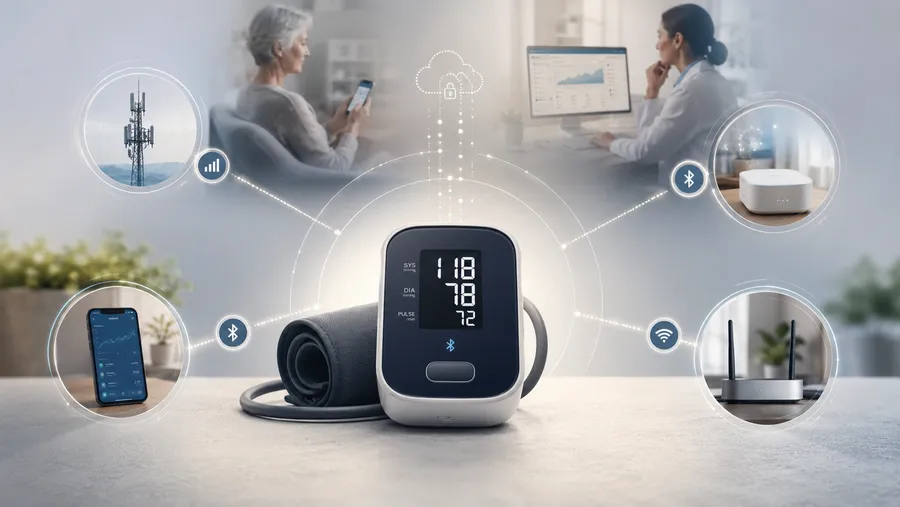
Remote patient monitoring succeeds when a valid measurement travels through a workflow that patients can complete and care teams can use. Connectivity changes the patient burden, failure points, and support responsibilities along the way.
A blood-pressure cuff can be clinically appropriate, technically connected, and still fail as a remote patient monitoring program.
The patient may not activate it. A Bluetooth device may pair once and then lose permissions after a phone update. A Wi-Fi device may stop working when a router password changes. A cellular device may remove the need for a smartphone or home broadband, but it still needs power, coverage, activation, and support.
The practical question is not, “Which radio is best?” It is: Which architecture gives this patient population the clearest, most manageable path from taking a measurement to having that measurement used appropriately?
Start with the program requirements
CMS describes remote patient monitoring as a patient collecting health data with a connected medical device that automatically transmits the data to a provider, who then uses it to treat or manage the patient’s condition. The agency identifies three connected components: patient education and device setup, device supply, and treatment management.
The current Medicare Learning Network guidance also requires an applicable acute or chronic condition, patient consent, electronic physiologic-data collection, automatic upload to a secure location, and a device that meets the FDA definition of a medical device. Data-collection requirements vary by code descriptor.
Those requirements do not prescribe cellular, Bluetooth, Wi-Fi, or another transport method. The network is an operating decision inside the care model. It should be evaluated by how well it fits the patient’s environment and how clearly the program can support the next step when something goes wrong.
Four architectures, four dependency profiles
Architecture | Patient dependencies | Where it can fit | Main support responsibility |
|---|---|---|---|
Direct cellular | Device power and network coverage | Patients without dependable smartphones or broadband | Activation, coverage, battery, and ongoing SIM or data-plan cost |
Bluetooth to smartphone | Compatible phone, app, pairing, permissions, and internet | Patients comfortable using a smartphone and app | Pairing, permissions, phone changes, and app support |
Bluetooth to dedicated hub | Powered hub, peripheral pairing, and cellular or Wi-Fi backhaul | Multi-device programs or patients who should not rely on personal technology | Hub provisioning, power, pairing, and backhaul |
Wi-Fi direct | Home broadband, router credentials, power, and room-level signal | Stable homes with reliable internet | Network setup, password changes, signal, and power issues |
Direct cellular can remove several patient-owned dependencies: a compatible smartphone, an app, Bluetooth permissions, home broadband, and a remembered Wi-Fi password. That subtraction can make enrollment easier for patients with limited digital access or programs seeking a standardized home setup. The tradeoff is an ongoing SIM or data-plan cost for each connected device, along with plan activation and lifecycle management. Cellular also does not eliminate the need for correct technique, power, coverage, and support.
Bluetooth-to-phone devices can provide an app-based experience with instructions, reminders, education, trends, and messaging. The tradeoff is that the patient’s phone becomes part of the care pathway. Pairing, permissions, charging, connectivity, operating-system changes, and phone replacement can all interrupt the flow.
A dedicated hub reduces reliance on the patient’s personal phone and can be useful when one patient receives several connected devices. If the hub supports multiple peripherals, they may share one backhaul connection and, where applicable, one cellular data plan—potentially reducing connectivity costs compared with giving each device its own cellular connection. That can simplify the patient workflow, but the program still owns provisioning, pairing, backhaul monitoring, and replacement; the patient may still need to keep the hub powered and positioned correctly.
Wi-Fi-connected devices can work well in homes with stable broadband and dependable room-level signal. Their dependencies are household-specific: router credentials change, coverage varies across the home, service or power can stop, and patients may move between locations.
No architecture wins for every population. The right choice is the one whose assumptions match the patient and whose failures the program can identify and recover.
Design for recovery, not just setup
Programs should map their actual enrollment path—whether referral, campaign, discharge workflow, direct outreach, or another route—and identify each responsibility handoff.
One illustrative journey is:
Selected → enrolled → delivered → activated → first valid reading → sustained use → reviewed → acted on → documented
Stages and order will vary; each handoff still needs a clear owner for patient action, technical support, and clinical responsibility.
Most importantly, the program should distinguish between different kinds of failure. “The patient did not take a reading” is not the same as “the patient took a reading but it did not upload.” A pairing problem is not the same as incorrect cuff placement. A depleted battery is not the same as disengagement.
When these causes are collapsed into nonadherence, the program directs the wrong help to the wrong person. The recovery path should provide plain-language instructions, an understandable support route, and a way to re-establish the device-to-patient connection without unnecessary repetition.
Home technology will fail sometimes; the goal is accurate attribution, practical recovery, and a patient experience that does not turn every problem into a technical investigation.
Make patient experience a core operating metric
Evaluate connectivity first by asking whether patients can complete the required steps without guessing:
- How many actions must the patient remember?
- Must the patient install, pair, update, or configure anything?
- Are instructions clear, readable, and consistent across the device, packaging, app, and support script?
- Can patients with vision, dexterity, language, cognitive, or health-literacy barriers complete the workflow?
- Can a caregiver participate without creating identity or privacy confusion?
- Does the patient know what a successful measurement looks like and what to do when something fails?
- Can support explain the problem without blaming the patient?
Patient-centered measures should include:
- Activation completion and first-attempt setup success
- Percentage reaching a first valid reading
- Continued participation at 30, 60, and 90 days
- Scheduled-reading continuity
- Failure reasons and recovery completion
- First-contact resolution and repeat-support contacts
- Patient-reported ease, clarity, confidence, and trust
- Results segmented by language, accessibility needs, caregiver involvement, device architecture, and home-technology context
These measures reveal whether the architecture is reducing work for patients or simply moving that work into a support queue.
Buyer requirements and regulatory accountability
Before comparing connectivity options, buyers should confirm that the exact device model has the appropriate FDA clearance, approval, or other required marketing authorization for its intended use. “FDA-cleared,” “FDA-approved,” and “FDA-authorized” are distinct claims. Registration or listing alone does not mean that FDA reviewed or authorized the device.
For every device, require its exact regulatory pathway and submission number, intended use and labeling. Also confirm that the program electronically collects and automatically transmits physiologic data to a secure location, associates the correct device and reading with the correct patient, teaches correct measurement technique, and provides a clear support path.
Buyers should know who owns education, activation, troubleshooting, replacement, clinical review, outreach, and documentation when patients change phones, routers, addresses, caregivers, or living arrangements.
Regulatory status is a threshold, not proof of program success; patient experience and operational accountability remain decisive.
Where Vironix fits
Vironix uses cellular-connected devices for supported measurements when removing smartphone pairing and home-Wi-Fi dependencies is the best fit for the population and workflow.
Cellular remains only one part of the service model: the program must pair it with patient selection, education, activation, device-health monitoring, outreach, escalation, documentation, and reporting.
The practice retains responsibility for clinical protocols, diagnosis and treatment decisions, payer requirements, and claims submission. Vironix’s role is to help make the path from device delivery to usable clinical information simpler, more visible, and easier to recover.
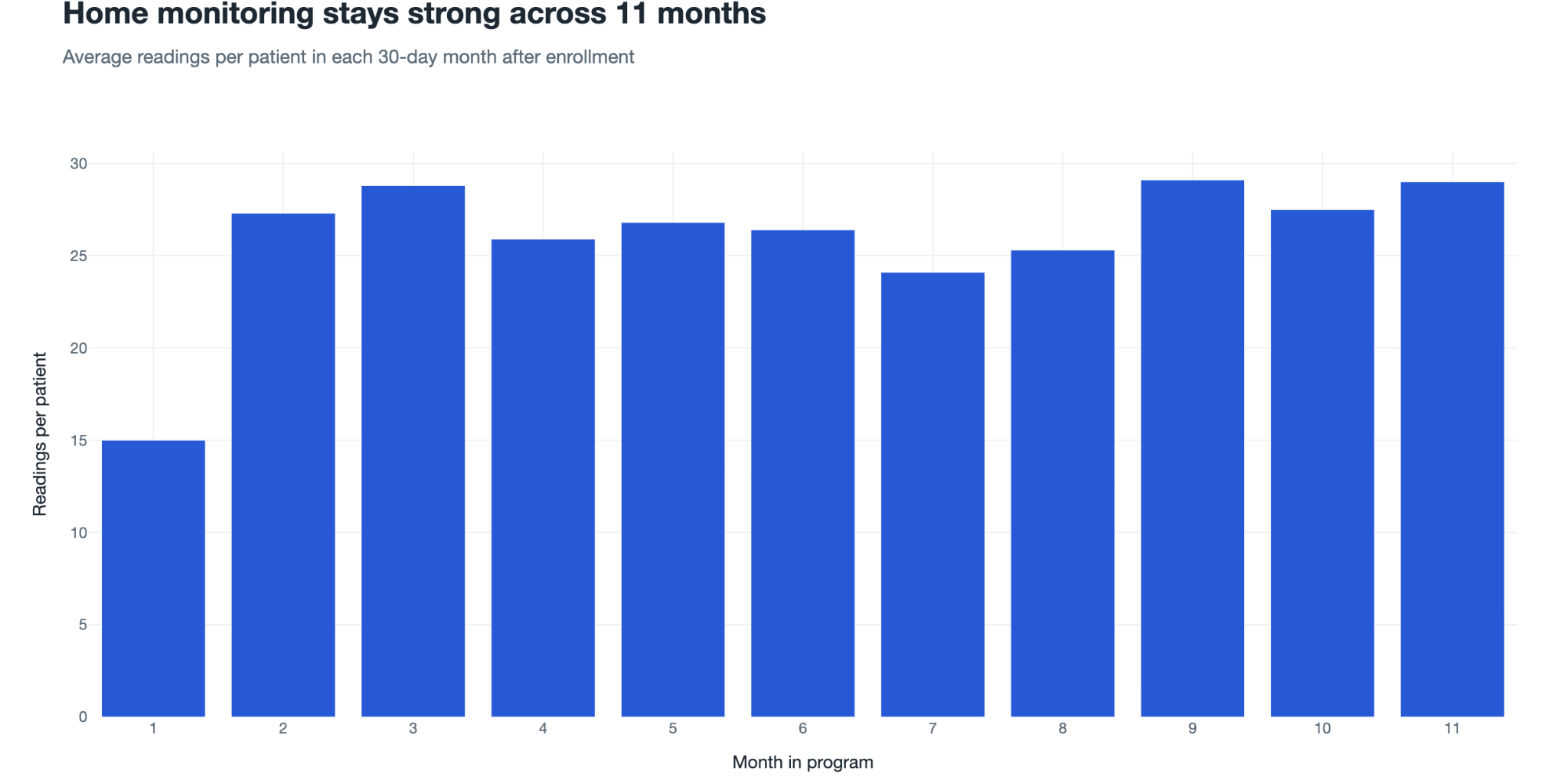
Patient engagement matters because a connected device only creates value when patients continue to use it. In this monitored Vironix group, average readings rose from about 15 per patient in month 1 to roughly 24–29 in months 2–11—nearly one reading per day on average. That consistency gives care teams a fuller longitudinal picture than sporadic measurements, although an average reading count does not mean every patient measured on every individual day.
The device is not the program
Connectivity matters because it determines which steps patients must complete and which failures a support team must solve. It does not replace education, accurate measurement, clinical review, appropriate action, or documentation.
The strongest RPM architecture is the one that fits the patient’s real environment, minimizes avoidable work, makes failure understandable, and helps the care team turn valid measurements into appropriate care.